
Choosing a project management system: ClickUp vs Monday vs Asana for SMBs
Asana, Monday.com and ClickUp will all run a £3M business perfectly well. They will also all fail inside one, and for the same reason: nobody decided how work should flow before choosing where it should live.
The short answer
Asana, Monday.com and ClickUp will all run a £3M business perfectly well. They will also all fail inside one, and for the same reason: nobody decided how work should flow before choosing where it should live.
Most comparison articles stop at features and pricing. That is the least useful part of the decision. Each of these tools is built on a different theory of what work is — a set of commitments, a set of records moving through stages, or a set of configurable objects. The tool that fits is the one whose theory matches how your business actually operates.
This guide covers the project management fundamentals underneath all three, the design logic each tool is built on, a head-to-head comparison for small and mid-sized businesses, and the rollout mistakes that quietly turn a new system into an expensive to-do list.
Five questions every system must answer before any tool
Software does not create a way of working. It records one. If the five questions below have no clear answer, any of these tools will faithfully digitise the confusion.
-
What is the unit of work? A task, a project, a client, a job, an order? An agency’s unit is the client engagement. A property manager’s is the unit or the tenancy. A manufacturer’s is the order. Pick wrong and every report will be awkward forever.
-
How does work move? Some work flows through fixed stages (lead → proposal → signed → onboarding). Some work is a one-off project with dependencies. Most SMBs have both, and they need different structures.
-
Who owns what? One named owner per piece of work. Shared ownership in a tool looks collaborative and behaves like nobody’s job. If you cannot fill in a simple RACI for a workflow, the tool cannot fix it.
-
What does “done” mean? Without a definition of done, statuses become opinions. “In progress” means anything from “started yesterday” to “stuck for three weeks”.
-
What does leadership need to see, and how often? Work backwards from the weekly leadership meeting. If the board view does not answer the questions asked in that meeting, people will rebuild the answer in a spreadsheet — and the tool becomes a side project.
There is also a sixth question that most owners skip: who maintains the system? Every work-management tool decays without an owner. Fields multiply, automations break, and archived boards pile up. Budget a few hours a month of someone’s time, or accept the decay.
Three methodologies, and where they fit
All three tools support the main project management approaches. What matters is which approach your work actually follows.
| Approach | Core logic | Typical SMB use |
|---|---|---|
| Waterfall / phased | Plan the whole job, then execute in sequence with dependencies | Construction, fit-outs, events, implementations |
| Kanban / flow | Visualise stages, limit work in progress, pull the next item | Sales pipelines, support, content, recurring client delivery |
| Agile / sprints | Fixed time-boxes, re-prioritise each cycle | Software, product, marketing teams with shifting priorities |
Most SMBs run a hybrid: a pipeline for repeatable work and phased projects for one-off initiatives. That hybrid is exactly where the three tools diverge.
Three theories of what work is
The biggest difference between these tools is not a feature. It is the data model — the assumption each one makes about what a unit of work is. Everything else, from reporting to automations to how easy it is to adopt, follows from that choice.
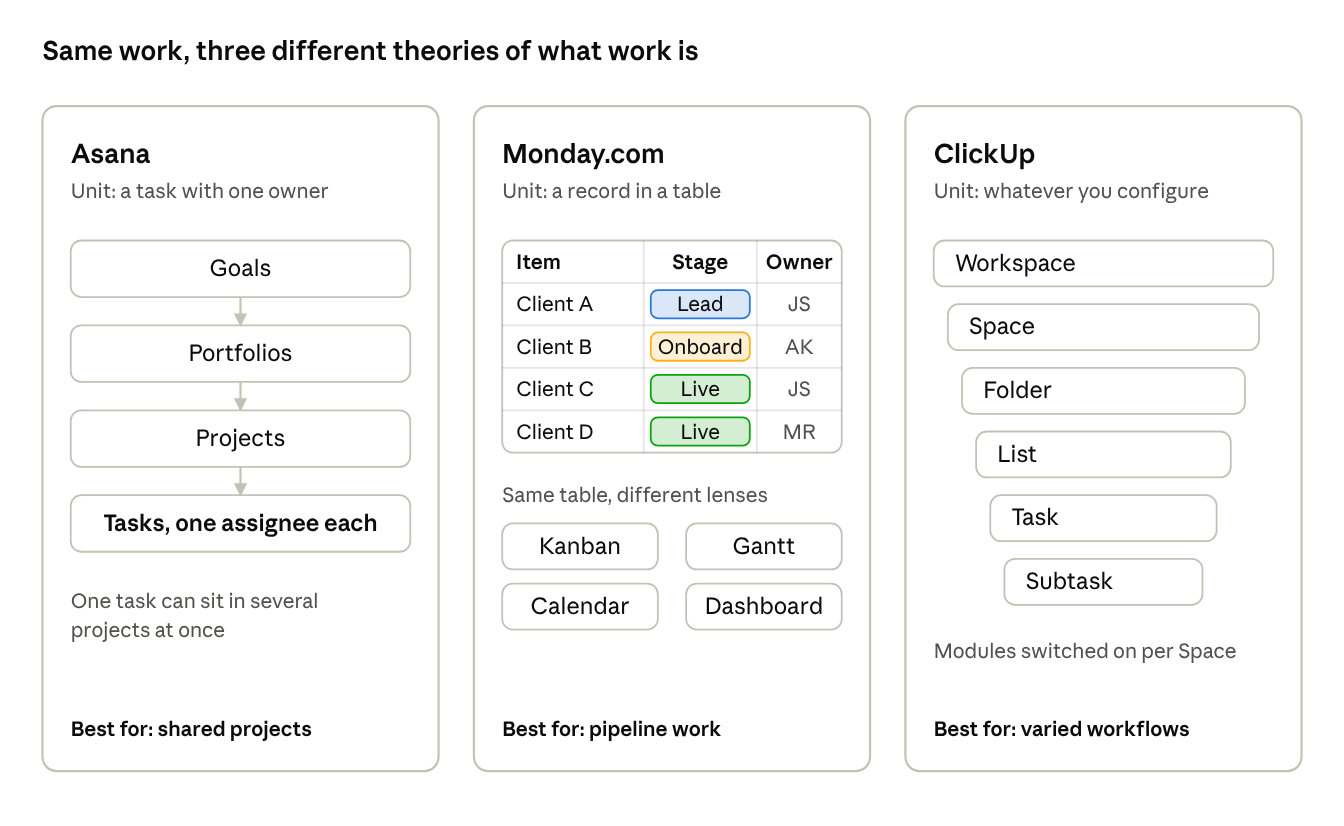
how each tool models work · 3 data models
Asana fixes the structure and asks you to fill it. Monday.com gives you a table and asks you to model your business in it. ClickUp gives you the parts and asks you to design the structure yourself.
Each tool, examined properly
Asana: built around commitments
The model. The task is the atomic unit, and every task has one assignee. Tasks sit in projects, projects roll up into portfolios, and portfolios connect to goals. A single task can live in several projects at once (“multi-homing”) without being duplicated, so the marketing launch and the product release can share the same deliverable.
Where it is strongest. Cross-functional work where the main question is “who owes what, by when?” The single-assignee rule enforces accountability without anyone having to police it. It is also the least work to keep tidy: the structure is opinionated, so there are fewer ways to build it badly. Unlimited automation rules and unlimited free guests from the Starter plan are genuinely useful for SMBs working with contractors and clients.
Where it breaks. Asana is a task system, not a database. If your core unit of work is a record with many attributes — a property, a SKU, a candidate, a deal — you will fight it. The leadership layer (portfolios, goals, resource management, time tracking) sits on the Advanced plan, so the realistic price for an owner who wants a company-wide view is the higher tier, not the entry one.
Fit. Professional services, marketing teams, and businesses that run on projects with deadlines and handoffs between departments.
Monday.com: built around records moving through stages
The model. A board is a table. Each row is an “item” — a task, a client, a job, an asset, anything — and each column is a typed field: status, person, date, number, formula, link to another board. Kanban, Gantt, calendar and dashboards are simply different lenses on that table. It is closer to a visual database than a project tool.
Where it is strongest. Anything pipeline-shaped: sales to delivery, client onboarding, recruitment, property and asset tracking, order fulfilment. Non-technical staff understand a coloured status column instantly, which makes adoption the easiest of the three. Free read-only viewers make it practical to show clients or the board their own status pages.
Where it breaks. Hierarchy is shallow — items and subitems — so complex multi-phase projects with dependencies feel bolted on. Because every team can design boards freely, accounts drift into dozens of inconsistent boards, and cross-board reporting turns into a web of connections and mirror columns. Check the plan limits carefully: the Standard plan includes 250 automation actions a month, while Pro raises that to 25,000; portfolio and resource management sit on Enterprise. Paid plans start at three seats and are sold in seat bundles, and the CRM is a separately priced product.
Fit. Operations-heavy SMBs, service businesses with a repeatable delivery process, and teams where adoption risk outweighs everything else.
ClickUp: built around configuration
The model. A deep, nested hierarchy — Workspace, Space, Folder, List, Task, Subtask — with docs, chat, whiteboards, goals and dashboards in the same product. Feature modules can be switched on per Space, so each department can run a different workflow under one roof.
Where it is strongest. Businesses with genuinely different workflows that want one system rather than five tools: an agency running creative, media and account management, or a company that wants tasks, SOPs and internal comms in one place. It has the lowest per-seat entry price, with native time tracking on the Unlimited plan.
Where it breaks. Flexibility is a liability without an architect. Two teams solving the same problem in two different ways is the default outcome, and the breadth of features creates a steeper learning curve than either competitor. The headline price also moves once you need the features owners usually want: timeline and workload views are trial-only on Unlimited, automation executions are capped at 1,000 a month on Unlimited and 5,000 on Business, and the AI tiers are sold separately on top.
Fit. Businesses with complex, varied workflows and a named internal owner — or an external partner — who will design and maintain the structure.
Head to head
No tool wins every row; the right one wins the rows that matter to your business. Prices are list prices in USD per user per month, billed annually, as published on each vendor’s pricing page in October 2026 — check before you buy, because all three changed packaging this year.
| Dimension | Asana | Monday.com | ClickUp |
|---|---|---|---|
| Core logic | Tasks and commitments | Records moving through stages | Configurable hierarchy |
| Paid entry price | $10.99 Starter | $9 Basic (3-seat minimum) | $7 Unlimited |
| Tier most SMBs actually need | Advanced, $24.99 | Pro, $19 | Business, $12 |
| Automations | Unlimited rules from Starter | 250 actions/month on Standard; 25,000 on Pro | 1,000 executions/month on Unlimited; 5,000 on Business |
| Leadership visibility | Portfolios and goals on Advanced | Advanced board views on Pro; portfolio and resource management on Enterprise | Goals and portfolios from Unlimited; full dashboards on Business |
| AI | Included requests and credits, then metered | Included credits per plan, then metered | Separate add-on: $9 Brain AI or $28 Everything AI |
| External users | Unlimited free guests | Free read-only viewers; guests from Standard | Guests with permissions from Unlimited |
| Ease of adoption | High | Highest | Lowest |
| Ongoing maintenance load | Low | Medium | High |
| Best-fit work | Cross-functional projects | Pipelines and operations | Varied workflows under one roof |
Sources: Asana pricing, Monday.com pricing, ClickUp pricing. The adoption and maintenance rows are professional judgement from implementation work, not vendor data.
The real cost is not the licence
For a 15-person team, the annual licence difference between the cheapest and most expensive realistic option is roughly $2,000–2,500 at list price. A failed rollout costs far more: months of duplicated work in spreadsheets, a team that now distrusts “the new system”, and a second migration. Choose on fit and total cost of ownership — including the hours someone spends maintaining it — not the headline seat price.
Which tool for which kind of business
Match the tool to the shape of your work, not to your industry label. These are the patterns we see most often in businesses between £3M and £20M.
| Business shape | What the work looks like | Lean towards | Why |
|---|---|---|---|
| Property or asset management | Each unit, tenancy or asset is a record with status, dates and a history | Monday.com | The record is the unit of work, which is exactly what a board models |
| Service business with a repeatable delivery process | Enquiry → proposal → onboarding → delivery → renewal | Monday.com | Pipeline-shaped, needs client-facing status and easy adoption |
| Professional services or consultancy | Client projects with deadlines and handoffs between specialists | Asana | Clear ownership, dependencies and timelines with little upkeep |
| Marketing team or in-house studio | Campaigns, approvals, recurring content, shared deliverables | Asana | Multi-homing and approvals suit work that crosses teams |
| Multi-service agency | Creative, media and account teams with different workflows | ClickUp | Per-team configuration under one roof, if someone owns the design |
| Founder-led team under 15 people | Tasks, SOPs and internal comms scattered across apps | ClickUp or Asana | ClickUp to consolidate cheaply; Asana if you want less to configure |
| Phased projects such as fit-outs or installations | Sequential stages, dependencies, external contractors | Asana | Timeline and Gantt from the entry tier, plus free guests |
Two warnings. First, most growing businesses have more than one shape — a pipeline at the front and projects at the back. Choose the tool that suits the shape that drives revenue, then make the other one work within it. Second, if two tools both fit, pick the one your least technical team member can use without help.
Why rollouts fail, and how to decide properly
The pattern is predictable. Someone signs up for a trial, builds boards or projects on the fly, invites the team, and declares the new system live. Within a few months half the team is back in spreadsheets and WhatsApp, and the owner concludes the tool “doesn’t work for us”.
The tool rarely caused that. Four things usually did:
-
No process design. The team digitised the current chaos instead of deciding how work should flow.
-
Too much, too soon. Every department, every automation and every dashboard launched in week one.
-
No owner. Nobody was accountable for the structure, so it decayed.
-
Leadership bypassed it. The moment the owner asks for updates by email, the system becomes optional.
A decision process that holds up
-
Map your five core workflows on paper. Answer the five questions above for each: unit of work, stages, owner, definition of done, and what leadership needs to see.
-
Identify the dominant shape. Is the revenue-driving work a pipeline of records or a set of projects? That alone usually narrows the field to two.
-
Price the tier you will actually need. Compare the plan that delivers the reporting and automation volume you require, at your real seat count — not the entry price.
-
Pilot one real workflow for two weeks in each shortlisted tool. Real work, real deadlines, the real team. A demo tells you what the tool can do; a pilot tells you what your people will do.
-
Decide on evidence. Which version did people update without being chased? Which one answered the leadership meeting’s questions? That is your tool.
-
Roll out in phases. One team, one workflow, stabilised, then the next. Name a system owner and give them protected time each month.
-
Make it the single source of truth. Run the weekly leadership meeting from the system. If it is not in the tool, it did not happen.
The decision underneath the decision
Choosing between Asana, Monday.com and ClickUp is a one-week decision. Deciding how your business should operate — who owns what, how work moves, what leadership needs to see every Monday — is the decision that determines whether any of them succeeds.
That is the work we do at Markinly. As fractional COOs for businesses in the £3M–£20M range, we design the operating model first and then build it into whichever tool fits: workflows, ownership, automations, dashboards and the leadership rhythm that keeps the system alive after we step back.
A note on independence: we are not resellers and we earn nothing from your choice of software.
If your team has outgrown its spreadsheets — or has already tried a tool and drifted back to them — talk to us. We will tell you honestly whether you need a new system, a better-designed version of the one you have, or neither.
Get the companion download: The SOP Playbook: Documentation That Actually Gets Used
A Markinly operating guide for CEOs, business owners and the managers who run their teams.


